Quick answer: A good dental website loads fast, works on a phone, is easy to navigate and turns visits into calls and bookings. Google calls a page fast when its Largest Contentful Paint is 2.5 seconds or less. A good dental website also shows real trust signals, meets WCAG 2.2 accessibility and has one page for each treatment.
Key takeaways
- Dental website design is the planning, layout, content and build of a practice’s website so that patients can find it, trust it and book from it.
- A good dental website has 8 parts: clear structure, a mobile-first layout, fast pages, booking and call paths, trust signals, treatment pages, accessibility and a technical SEO base.
- The numbers to hold a site to are Google’s Core Web Vitals thresholds (2.5 seconds, 200 milliseconds and 0.1) and the 9 criteria that WCAG 2.2 added to WCAG 2.1.
- A website is built in 4 steps: plan, design, build and test, then launch and measure.
- At Dental Master Media, a new dental website costs $999 for 10 pages, and a redesign costs $999 for up to 100 pages.
- The U.S. Department of Justice applies the ADA to the websites of businesses open to the public, so accessibility and patient privacy belong in the design brief.
- Dental website design shapes SEO and AI search results, because Google only shows pages it can crawl, index and render well on a phone.
What is dental website design?
Dental website design is the process of planning, laying out, writing and building a dental practice’s website so that new patients can find the practice, trust it and book an appointment. Dental website design covers how the site looks, how it is organized, how fast it loads, what each page says and how a patient reaches the phone number or booking form.
A dental website is the one place a practice controls completely. A Google Business Profile, a review site or a social account all sit on someone else’s platform, while the dental website holds the treatment pages, the team and the booking path. Good dental website design makes those pages easy for people to use and easy for search engines to read.
That is why design and search visibility are one job at Dental Master Media. Our dental SEO services start with a website that Google can crawl and a patient can use, because ranking a page that visitors abandon does not bring in patients.
What are the 8 parts of a good dental website?
A good dental website has 8 parts, and every part is listed below with the practice question it answers. The parts run from what a patient sees first to what search engines check last.
- Clear structure and navigation, so a patient finds a service or the phone number in one tap.
- A mobile-first layout, because Google indexes the mobile version of a dental website.
- Fast, stable pages that meet the Core Web Vitals thresholds.
- Booking and call paths on every page.
- Trust signals such as real team photos, reviews and clear contact details.
- Treatment pages with one page for each service.
- Accessibility that follows WCAG 2.2.
- A technical and local SEO base that includes schema markup and a matched Google Business Profile.
Clear structure and navigation
Clear structure and navigation means a dental website has a short main menu, a logical page hierarchy and a visible phone number and booking button on every page. A patient who lands on the homepage on a phone should reach a treatment page, the team page or the booking form within 2 taps.
The homepage carries the most weight, so it should say who the practice is, where it is and what to do next. Our guide to what a dental website homepage should include lists the elements, in order.
Mobile-first layout
A mobile-first layout means the dental website is designed for the phone screen first and then widened for desktop. Google Search Central confirms that Google uses the mobile version of a site’s content for indexing and ranking, so any text, heading or image missing on the mobile version is missing for Google too.
In practice, the mobile dental website needs the same headings, the same metadata and the same structured data as the desktop version, with buttons large enough to tap and text that does not need zooming. Tabs and accordions are fine, because Google says content hidden in them is still indexed.
Fast, stable pages
Fast, stable pages meet Google’s Core Web Vitals thresholds: Largest Contentful Paint of 2.5 seconds or less, Interaction to Next Paint of 200 milliseconds or less and Cumulative Layout Shift of 0.1 or less. Google measures each at the 75th percentile of real page loads, separately for mobile and desktop.
Page speed also affects patients directly. Google research reported by Marketing Dive on September 12, 2016 found that 53% of mobile visitors leave a page that takes more than 3 seconds to load. The figure is old, so treat it as a direction and test your own pages. Our guide on how to speed up a dental website and pass Core Web Vitals shows how.
Booking and call paths
Booking and call paths are the buttons, phone links and forms that let a patient act, and a good dental website puts one on every page. The best path matches how your practice takes new patients: a tap-to-call link on mobile, an online booking link, or a short request form that asks for a name, a phone number and a preferred time.
Each path needs a tracked result, or you cannot tell which page produces new patients. If your visits are not turning into calls, read why dental website visits do not convert and check call tracking before you change the design.
Trust signals
Trust signals are the visible proof that a real practice stands behind the website, such as photos of the actual team, dentist bios, patient reviews, the address, the phone number and the practice’s licenses. Google’s guidance on helpful content says that, of the 4 parts of E-E-A-T, trust is the most important, and dental pages are health content that Google treats with extra care.
Use real photos, not stock images, and keep every fact the same on the website and on your Google Business Profile. Our guide to the trust signals dental patients check covers which ones to show and where.
Treatment pages
Treatment pages are separate website pages for each service, such as implants, clear aligners, veneers or emergency care, and a good dental website has one for each treatment the practice wants to grow. A single page that lists 12 services cannot answer the questions a patient asks about one of them.
Each treatment page should answer what the treatment is, who it suits, what the visit involves, how long it takes and how to book, in the order patients ask. A page for each treatment also gives the new patients you want a direct page to land on from Google.
Accessibility
Accessibility means people with visual, hearing, motor or cognitive disabilities can use the dental website, and the standard to follow is WCAG 2.2 from the World Wide Web Consortium (W3C). WCAG 2.2 adds 9 success criteria to WCAG 2.1, including larger tap targets, visible keyboard focus and easier forms.
Accessibility also helps every patient, because readable text, strong color contrast and labeled form fields work better for people on a phone in bright light. Our dental website accessibility checklist turns the standard into fixes a web developer can make.
Technical and local SEO base
A technical and local SEO base means the dental website is crawlable, indexable and marked up so that Google understands the practice. It includes clean page titles, an XML sitemap, secure HTTPS, schema markup for the dentist and the local business, and details that match the Google Business Profile exactly.
This base is invisible to patients, and it decides whether a good-looking dental website gets found. Use the technical SEO checklist for dental websites before launch and again after any change.
What do the numbers say about dental website design?
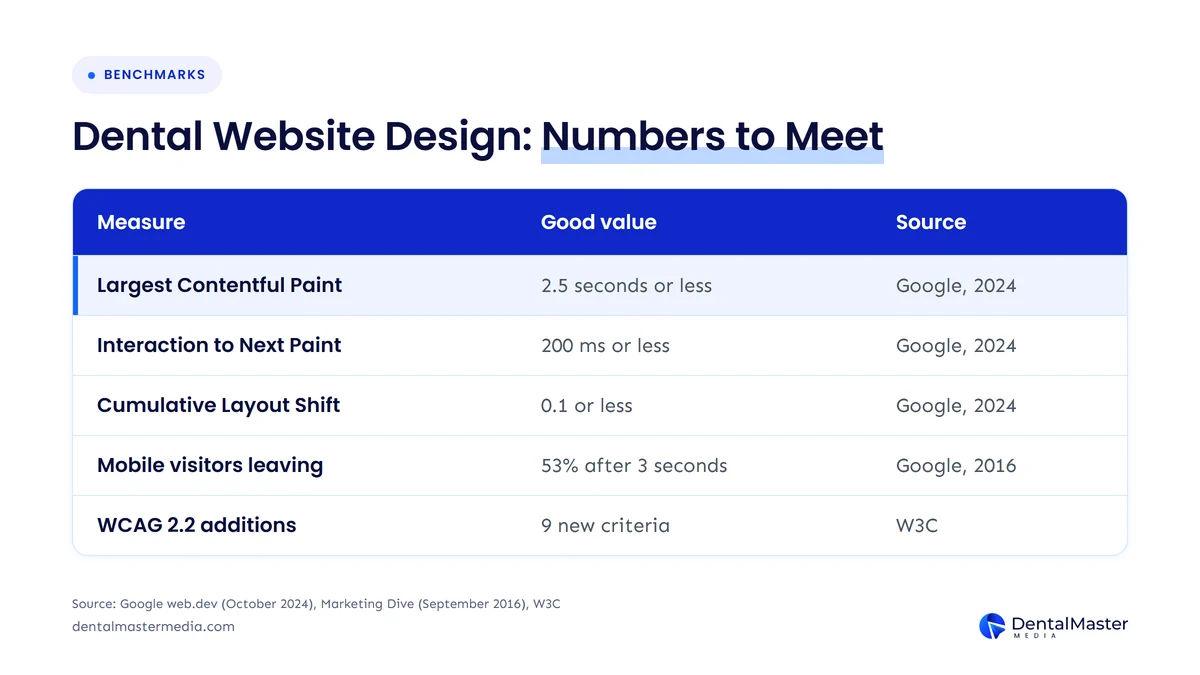
The numbers that matter for dental website design are the Core Web Vitals thresholds, the share of mobile visitors who leave slow pages and the changes in WCAG 2.2. The table below lists each number with its publisher and date.
| Measure | Good value | What it tells you | Source (publisher, date) |
|---|---|---|---|
| Largest Contentful Paint (LCP) | 2.5 seconds or less | How fast the main content appears | Google, web.dev, updated October 31, 2024 |
| Interaction to Next Paint (INP) | 200 milliseconds or less | How fast the page reacts to a tap or click | Google, web.dev, updated October 31, 2024 |
| Cumulative Layout Shift (CLS) | 0.1 or less | How much the layout jumps while loading | Google, web.dev, updated October 31, 2024 |
| Mobile visitors who leave slow pages | 53% leave after 3 seconds | What a slow page costs in visits | Google research via Marketing Dive, September 12, 2016 |
| WCAG 2.2 success criteria added | 9 new criteria | What accessibility testing now checks | W3C, WCAG 2.2 |
The table shows that speed and accessibility are measurable, so a dental practice can ask a designer to meet a stated number before the website launches.
How is a dental website designed, step by step?
A dental website is designed in 4 steps: plan the goals and pages, design the layouts, build and test, then launch and measure. Each step has an output you can check, so the project does not drift.
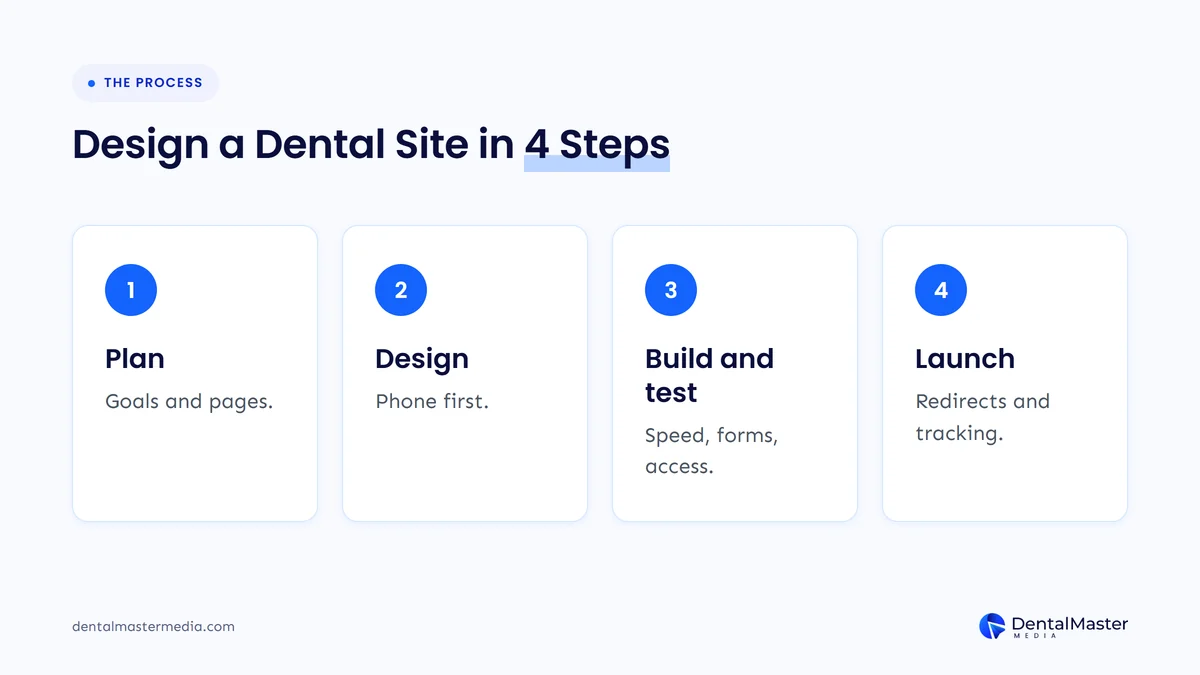
The 4 steps of the dental website design process are listed below, with the output of each.
- Plan the goals and pages: write down the treatments to grow, the pages the dental website needs and the one action each page should drive.
- Design the layouts mobile-first: draw the homepage and a treatment page for a phone first, with the booking button and phone number in view.
- Build and test the pages: write the content, build the site and check page speed, accessibility and every form before anyone sees it live.
- Launch and measure the results: set up 301 redirects from old URLs, connect Google Analytics 4 and Google Search Console, and track calls and bookings.
Dental Master Media builds on WordPress with Elementor Pro, mobile-first, and nothing goes live until the practice approves it. If you are choosing a designer, our list of questions to ask a dental website designer shows what to check first.
How much does dental website design cost?
At Dental Master Media, dental website design costs $999 for a new website of 10 pages, and a full redesign costs $999 for up to 100 pages. A new website takes about 30 days to build, and we provide 30 days of support after launch.
These prices are for our own service, and other providers set their own. Compare any quote by what it names: the number of pages, who writes the content, whether SEO setup and tracking are included, how many rounds of design feedback you get and how long support lasts. A quote that lists only a page count leaves the rest to guesswork.
New dental website or redesign: which path and platform?
Build a new dental website when the practice has no website, is changing its name or location, or has a site that cannot be repaired. Choose a redesign when the practice has a working website with rankings, pages and links worth keeping, and wants a faster, better-looking dental website without losing them.
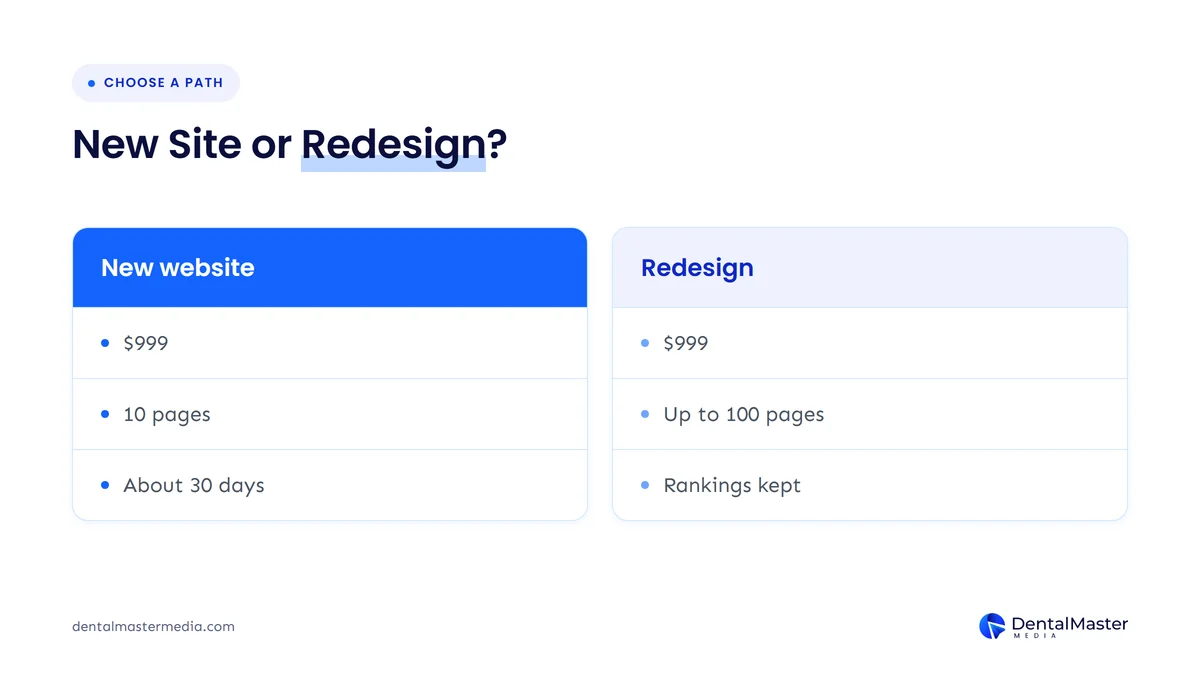
In dental website design, the path matters more than the platform. A redesign keeps its rankings only when old URLs redirect to their new versions with 301 redirects and the content that ranked is kept. Our guide to the signs you need a new dental website helps you decide which path fits.
On platform, WordPress, Wix and Squarespace can all produce a good dental website, and the right choice depends on who updates the site, how much custom design you need and whether you want to own the files. Compare the options in dental website platforms compared before you sign a contract.
Which rules apply to a dental website?
Two sets of rules shape dental website design in the United States: the Americans with Disabilities Act (ADA) for accessibility and HIPAA for patient privacy. This is general information, not legal advice, so ask your attorney or compliance adviser about your own practice.
On accessibility, the U.S. Department of Justice states in its March 18, 2022 guidance that the ADA applies to the websites of businesses open to the public. The Department says it has no regulation that sets detailed web standards, and it points to WCAG and the Section 508 Standards as helpful guidance, so WCAG 2.2 is the practical target.
On privacy, a dental practice that sends insurance claims electronically is a HIPAA covered entity, and its website tools need a review. On June 20, 2024, a federal court in the Northern District of Texas, in American Hospital Association v. Becerra, vacated part of the HHS Office for Civil Rights bulletin on online tracking technologies, and HHS later withdrew its appeal. The court did not remove the duty to protect patient information, so list every tracking tool on your website, such as analytics and advertising pixels, and keep them off appointment and patient-portal pages unless your privacy adviser approves them.
Does dental website design affect SEO and AI search?
Yes, dental website design affects SEO and AI search, because Google can only show pages it can crawl, index and render well on a phone. Google Search Central’s guide to generative AI features says no special AI markup is needed, and that the usual SEO fundamentals, including a good page experience and internal links, still apply to AI Overviews and AI Mode.
That makes the 8 parts above the foundation for search as well as for patients: crawlable treatment pages, fast pages, a matched Google Business Profile and clear headings. Ongoing dental SEO at Dental Master Media runs at $749, $1,250 or $1,999 a month, and it works best on top of a website that already meets these basics.
The biggest design risk to search is a launch that changes URLs without redirects. If a redesign has already cost you traffic, read why dental sites lose rankings after a redesign for the causes and the fixes.
Frequently asked questions
How long does it take to build a dental website?
A new dental website takes about 30 days to build at Dental Master Media, counted from the day we have access to your hosting and domain. The time depends on how quickly the practice supplies photos, team details and approvals, and every site gets 30 days of support after launch.
What should a dental website include?
A dental website should include a clear homepage, one page for each treatment, a team page, patient reviews, an address and phone number, a booking path and a mobile-first layout. It also needs fast pages, WCAG 2.2 accessibility and schema markup that matches your Google Business Profile.
Is WordPress good for a dental website?
Yes, WordPress is a good platform for a dental website when it is built and maintained well. Dental Master Media builds dental websites on WordPress with Elementor Pro. The platform matters less than the page speed, the page structure and who maintains it after launch.
Does a dental website need to be ADA compliant?
Yes, a dental website should be built for accessibility, because the U.S. Department of Justice says the ADA applies to the websites of businesses open to the public. The Department has no detailed web regulation and points to WCAG, so WCAG 2.2 is the standard to follow. Ask your attorney about your own practice.
Can a dental website redesign lower my Google rankings?
Yes, a redesign can lower Google rankings when URLs change without 301 redirects or when content that ranked is removed. A planned redesign keeps the old URLs mapped to the new pages, keeps the ranking content and checks Google Search Console after launch.
Conclusion: what makes a good dental website?
A good dental website is fast, mobile-first, easy to navigate, accessible and built around booking, with trust signals and one page for each treatment. Good dental website design treats the patient and the search engine as one audience.
At Dental Master Media, we build and rank dental websites together, from dental website design and development to dental SEO services, so the site patients see is also the site Google can read.
To go deeper on one part, start with the dental website homepage guide, the Core Web Vitals speed guide or the technical SEO checklist for dental websites.
Talk through your dental website with us
Not sure whether your practice needs a new dental website or a redesign? Book a free strategy call with Dental Master Media. We will look at your current site, your treatment pages and your booking path, and tell you which fixes come first.
Sources
- Google, web.dev, “Web Vitals”, updated October 31, 2024. https://web.dev/articles/vitals
- Google Search Central, “Mobile-first indexing best practices”, accessed November 19, 2026. https://developers.google.com/search/docs/crawling-indexing/mobile/mobile-sites-mobile-first-indexing
- Google Search Central, “Creating helpful, reliable, people-first content”, accessed November 19, 2026. https://developers.google.com/search/docs/fundamentals/creating-helpful-content
- Google Search Central, “Optimizing your website for generative AI features on Google Search”, May 15, 2026. https://developers.google.com/search/docs/fundamentals/ai-optimization-guide
- Marketing Dive, “Google: 53% of mobile users abandon sites that take over 3 seconds to load”, September 12, 2016. https://www.marketingdive.com/news/google-53-of-mobile-users-abandon-sites-that-take-over-3-seconds-to-load/426070/
- W3C, “Web Content Accessibility Guidelines (WCAG) 2.2”. https://www.w3.org/TR/WCAG22/
- U.S. Department of Justice, ADA.gov, “Guidance on Web Accessibility and the ADA”, March 18, 2022. https://www.ada.gov/resources/web-guidance/
- HHS Office for Civil Rights, “Use of Online Tracking Technologies by HIPAA Covered Entities and Business Associates”. https://www.hhs.gov/hipaa/for-professionals/privacy/guidance/hipaa-online-tracking/index.html
- American Hospital Association, “Judge rules in favor of AHA, vacating HHS online tracking bulletin”, June 20, 2024. https://www.aha.org/news/news/2024-06-20-judge-rules-favor-aha-vacating-hhs-online-tracking-bulletin-unlawful-and-beyond-agency-authority
- Morrison Foerster, “A MoFo Privacy Minute Q&A: HHS Withdraws Appeal of Federal Court Decision Regarding Online Tracking Guidance”, September 2024. https://mofo.com/resources/insights/240930-a-mofo-privacy-minute-q-a-hhs-withdraws
- Dental Master Media, “Dental Website Design and Development” (prices and timeline). https://dentalmastermedia.com/dental-web-development/

Suraj Rana is the owner of Dental Master Media and a leading expert in SEO for dental practices. With a passion for dental marketing, he has successfully helped numerous dental clinics climb the search engine ranks. Suraj’s expertise makes him a go-to resource for effective, results-driven dental marketing.