Quick answer: On November 24, 2026, Google added 2 Search Central pages on generative AI. One explains how AI Overviews and AI Mode select and link sources: ranked results, related searches, then supporting pages. The other lists 5 generative AI controls. A dental practice needs no new markup, but its pages must be indexed and snippet-eligible.
Key takeaways
- Google Search Central added 2 pages on November 24, 2026: “Attribution and factuality in Search generative AI features” and “Control how your content is used for generative AI at Google”.
- AI Overviews and AI Mode pick source links in 4 stages: ranked results from the Search index, related searches called query fan-out, a response grounded in supporting pages, and a link display chosen for relevance, quality and source diversity.
- Google lists 5 generative AI controls: the Search generative AI control in Search Console, Google-Extended, GoogleOther, snippet controls and noindex.
- No dental practice has to change its website because of these pages. Google states that there are no additional requirements to appear in AI Overviews or AI Mode.
- The 5 checks a dental practice should run now cover indexing, snippet settings, the Search Console setting, robots.txt and Google Business Profile facts.
- This post covers the official explanation. Link position inside AI Overviews is a separate story we covered earlier.
What did Google add to Search Central about AI Overviews and AI Mode?
Google added 2 documentation pages to Google Search Central on November 24, 2026. The Google Search Central updates log describes the entry as “Added documentation about generative AI controls and attribution”, and it covers how AI Overviews and AI Mode select and link sources, plus a list of the controls site owners have.
The first page is titled “Attribution and factuality in Search generative AI features” and explains how Search generative AI features select and link to sources. The second is titled “Control how your content is used for generative AI at Google” and lists the settings that manage training, grounding outside Search, and grounding inside Search. Both pages show a last-updated date of November 24, 2026. Barry Schwartz of Search Engine Roundtable reported the attribution page the same day.
Every dental practice with a dental website that Google can crawl is affected, because the pages describe how a practice’s content is used in AI Overviews and AI Mode. The pages do not announce a new ranking factor or a new requirement. They document how the system works and which controls exist, and the checks later in this post are part of our dental SEO services.
How do AI Overviews and AI Mode select and link sources?
AI Overviews and AI Mode select and link sources in 4 stages, according to Google’s attribution page. The 4 stages of source selection are listed below in the order Google describes them.
- Start from Search results: Google takes top-ranked results from the Google Search index, checks them for relevance, and uses their snippets to inform the AI Overviews response.
- Run related searches: the model may run related searches, known as query fan-out, to find pages that cover different parts of the question.
- Ground the response: the AI Overviews response is grounded in web results and cites the pages that support it.
- Choose the source links to display: Google shows source links while balancing relevance, quality and source diversity.

Query fan-out matters to a dental practice because one patient question can trigger a set of related searches. A question such as “how long do dental implants last” can pull in pages about implant materials, healing and cost, so a practice page can be linked for a part of the question it answers well, even if it is not the top result for the full question.
How does Google show source links in AI Overviews?
Google shows source links in AI Overviews in 3 formats: inline icons, grouped cards and carousels. The attribution page says the display balances relevance, quality and source diversity, so Google, not the site owner, decides which supporting pages get a visible link.
Site owners control eligibility, not selection. A page must be indexed and eligible to appear in Google Search with a snippet, and the AI features page adds that there are 0 additional technical requirements for AI Overviews or AI Mode. Googlebot access is managed through robots.txt, the same file used for every other Google Search crawl.
What does Google do to check accuracy in AI Overviews?
Google checks accuracy in AI Overviews before and after a response appears. Before a response is shown, safety and policy guardrails can suppress answers on sensitive topics or where reliable consensus is lacking, and claims are checked against web results, data feeds and the Knowledge Graph.
After launch, Google says it runs automated claim checks, accuracy benchmarks, pre-launch offline and A/B testing, and collects user feedback. The page publishes no accuracy or error rate, so a dental practice cannot treat any AI Overviews answer about treatments or costs as verified. Patients may still see a wrong answer, and the feedback route in the troubleshooting section below is the practice’s tool.
Which generative AI controls does Google list for AI Overviews?
Google lists 5 generative AI controls: the Search generative AI control, Google-Extended, GoogleOther, snippet controls and the noindex rule. The controls page says they manage foundation model training, grounding outside Search and grounding inside Search separately, and they can be used on their own or combined. The table below sets the 5 controls side by side.

| Control | Where you set it | What it governs |
|---|---|---|
| Search generative AI control | Search Console settings | Use of your content for grounding, and display of links, in AI Overviews, AI Mode and Discover generative AI features. Not model training. |
| Google-Extended | robots.txt | Use of your content to train and ground certain commercial generative AI products. Not a ranking signal. |
| GoogleOther | robots.txt | Google’s generic crawler for non-Search uses such as one-off research. Does not affect Search. |
| nosnippet, data-nosnippet, max-snippet | Page HTML or X-Robots-Tag header | Snippet and preview length in Google Search, including AI Overviews and AI Mode. Can also stop direct input to AI Overviews. |
| noindex | Page HTML or X-Robots-Tag header | Removes a page from Google Search results, including Search generative AI features. |
The table shows that only the Search generative AI control and the snippet controls act on AI Overviews directly, while noindex removes a page from all of Google Search. Google also says it intends to support a shared training preference signal, with the user agent __usage_ai-training, in early 2027.
What does the Search generative AI control do?
The Search generative AI control manages whether your content is used for grounding or displayed, including links, in AI Overviews, AI Mode and the Discover generative AI features. You set it in Search Console settings. Google says it does not affect model training and is not a ranking or inclusion signal for other parts of Search.
Google separates training from grounding. Training teaches foundation models general language patterns before deployment. Grounding retrieves fresh information from the Search index at answer time, and Google says allowing it can show links to your site and may send traffic. Search Console also reports AI features inside the Performance report under the Web search type, as we explain in our guide to the new Search Console AI Overviews report.
Which setting fits which goal?
Google’s controls page matches each goal to one setting. The 4 most relevant goal and setting pairs for a dental practice are listed below.
- Stay fully visible in AI Overviews and AI Mode: keep the site accessible to Googlebot, do not disallow Google-Extended, and do not exclude the site with the Search generative AI control.
- Stay in Google Search but opt out of AI Overviews and AI Mode: set the Search generative AI control to exclude links and content from those features.
- Stay in AI Overviews but limit training and non-Search grounding: disallow Google-Extended in robots.txt.
- Limit a snippet or exclude one passage from grounding: use max-snippet, data-nosnippet or nosnippet in the page code.
Google’s full table has 7 rows. The other 3 combine these settings, keep a page out of Google Search entirely with noindex, or make paywalled content available with structured data.
Which dental practices are affected by the AI Overviews controls?
Every dental practice whose pages Google can crawl is affected, because the controls apply by default to any site Googlebot can reach. Content available to Googlebot may be used by Google Search, including generative AI features, and by non-Search products such as the Gemini app, unless a control says otherwise.
Most practices need no change. The default state, with pages indexed and no exclusion set, is the full-visibility setting in Google’s table. The practices that should act are those that blocked Googlebot by mistake, those whose service pages carry a nosnippet or noindex tag, and those with a legal or contractual reason to limit training. Local searches show how much is at stake, and our article on how Google AI Mode is reshaping local search for dental practices covers that side.
What should a dental practice check for AI Overviews now?
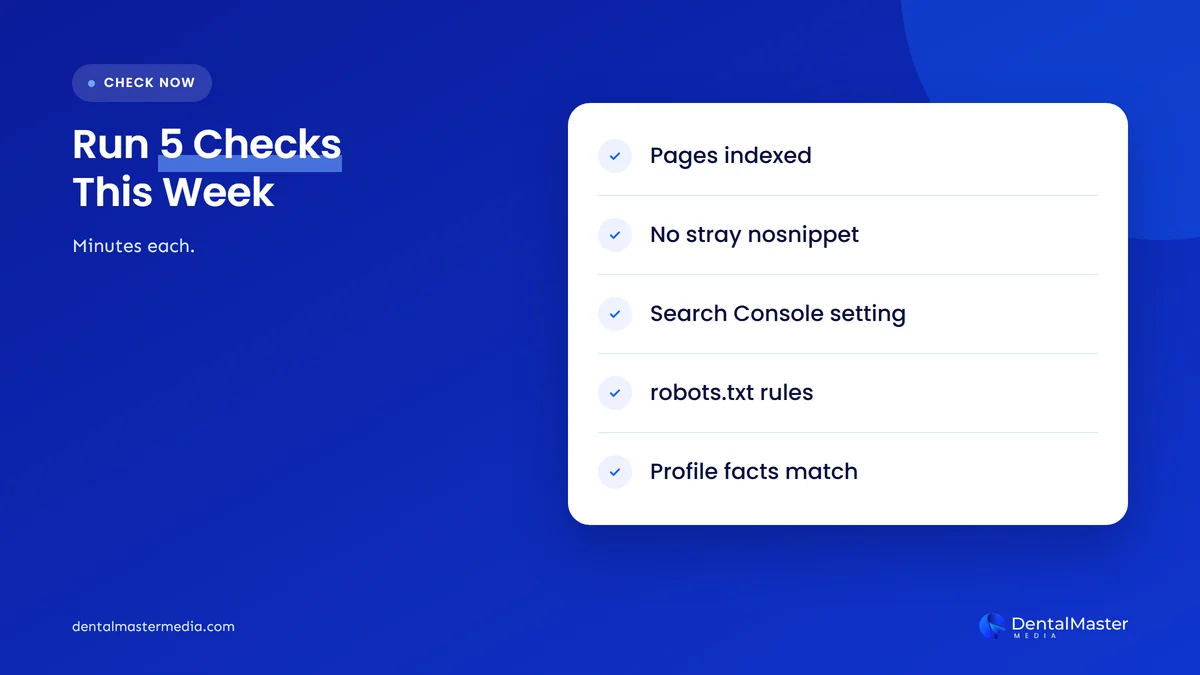
A dental practice should run 5 checks now: indexing, snippet settings, the Search Console setting, robots.txt and Google Business Profile facts. Each check takes minutes, and none needs a developer unless a tag turns out to be wrong. The 5 checks are listed below.
- Check indexing: open the Page indexing report in Google Search Console and confirm that the service, dentist and contact pages are indexed.
- Check snippet tags: view the source of the main service pages and confirm there is no nosnippet, max-snippet or noindex tag that you did not choose.
- Check the Search generative AI control: open Search Console settings and confirm the site has not been excluded from Search generative AI features.
- Check robots.txt: confirm that Googlebot is allowed on your dental website and that any Google-Extended rule matches a decision the practice made.
- Check Google Business Profile facts: confirm the practice name, address, phone number and hours match your website, because Google checks AI claims against web results, data feeds and the Knowledge Graph.
Google’s own best practices point the same way: publish helpful, reliable content with important information in text and clear sourcing or author background, keep facts accurate and current, and do not change dates unless the content changed substantially. Our Google Business Profile settings guide covers the profile side of check 5.
How is this different from Google moving links lower in AI Overviews?
This news is the official explanation of how links are selected and which controls exist, while the earlier story was about where links sit inside an AI Overviews answer. The 2 stories answer different questions, and a practice needs both.
Our earlier post, Google Is Pushing Links Further Down AI Overviews, covered third-party data on link position and noted that Google had not confirmed the figures. The 2 pages Google published on November 24, 2026 do not discuss link position. They describe selection and display in general terms and do not publish an accuracy rate or a click figure, so no claim about traffic lost or gained follows from them.
Frequently asked questions about AI Overviews
The 5 questions below are the ones dental practice owners are most likely to ask about the new AI Overviews documentation.
Can a dental practice opt out of AI Overviews?
Yes, a dental practice can opt out of AI Overviews with the Search generative AI control in Search Console. Google says the setting manages whether your content is used for grounding or displayed, including links, in AI Overviews and AI Mode. It does not affect model training.
Does Google-Extended block AI Overviews?
No, Google-Extended does not block AI Overviews or AI Mode. Google says the robots.txt token limits use of your content to train and ground certain commercial generative AI products, and it is not a ranking signal or an inclusion signal for Search.
Does a dental website need special markup to appear in AI Overviews?
No, a dental website needs no special markup to appear in AI Overviews. Google says there are no additional requirements beyond being indexed and eligible to appear in Google Search with a snippet, and meeting them does not mean Google will definitely crawl, index or serve the page.
Can nosnippet keep my pages out of AI Overviews?
Yes, nosnippet and max-snippet can prevent your content from being a direct input to AI Overviews and AI Mode, according to Google. Use data-nosnippet to exclude one passage, and weigh the cost first, because the same controls limit your snippets in Google Search.
What should a dental practice do if an AI Overviews answer credits the wrong source?
Use the Feedback link below the AI response. Google also says to update your page and request a recrawl if the problem is on your page, and to file a DMCA request if another site copied your content. The Removals tool is for urgent issues and lasts about 6 months.
Conclusion: What Dental Practices Should Take From the AI Overviews Update
Google’s 2 new pages confirm that AI Overviews and AI Mode link sources from the Search index through query fan-out and grounding, and that site owners control eligibility through 5 settings, not selection. A dental practice needs no new markup. It needs indexed pages, snippet settings it chose on purpose, the Search Console setting left as intended, and facts that match across the website and Google Business Profile.
At Dental Master Media, we run these checks as part of our dental SEO services, so a practice knows where it stands before it decides on any opt-out. Book a free strategy call and we will go through the 5 checks on your own website and Search Console.
Find out where your practice stands in AI Overviews
On a free strategy call, we review your indexing, snippet tags, Search Console settings and Google Business Profile facts, and tell you which of the 5 checks need work. You leave with a clear list, not a sales pitch.
Sources
- Google Search Central, “Attribution and factuality in Search generative AI features”, last updated November 24, 2026. https://developers.google.com/search/docs/fundamentals/gen-ai-attribution-factuality
- Google Search Central, “Control how your content is used for generative AI at Google”, last updated November 24, 2026. https://developers.google.com/search/docs/fundamentals/gen-ai-controls
- Google Search Central, “AI features and your website”. https://developers.google.com/search/docs/appearance/ai-features
- Google Search Central, “Latest Google Search Documentation Updates: Added documentation about generative AI controls and attribution”, November 24, 2026. https://developers.google.com/search/updates
- Search Engine Roundtable, Barry Schwartz, “Google On How Links Are Selected & Shown In AI Overviews & AI Mode”, November 24, 2026. https://www.seroundtable.com/google-ai-overviews-ai-mode-link-selection-42617.html
- Dental Master Media, “Google Is Pushing Links Further Down AI Overviews: What Dental Practices Should Check”, November 26, 2026. https://dentalmastermedia.com/blog/google-links-lower-ai-overviews-dental/

Suraj Rana is the owner of Dental Master Media and a leading expert in SEO for dental practices. With a passion for dental marketing, he has successfully helped numerous dental clinics climb the search engine ranks. Suraj’s expertise makes him a go-to resource for effective, results-driven dental marketing.