Quick answer: A multi-location dental group should run one Google Business Profile, one location page and one review stream for each office. Google’s guidelines allow only 1 profile for each location, and every location in a country shares one name and one primary category. Manage access through a business group, not a shared login.
Key takeaways
- A multi-location dental group needs 3 things for each office: a verified Google Business Profile, a location page on its website and its own reviews.
- Google allows 1 Business Profile for each location. Virtual offices and support staff do not get profiles, and a dentist gets one only when patients can reach that dentist directly at the office.
- The business name and primary category stay the same on every profile. The address, phone number, hours, photos and website link differ by office.
- A business group gives your team shared access to every profile. Owners and managers can both create, edit and delete profiles.
- Each location page needs its own address, phone, hours, dentists and services, and its own LocalBusiness markup. Near-identical pages risk doorway abuse.
- Track reviews for each office separately: 97% of consumers read reviews, and Google’s rules ban incentives and selective requests at every office.
What does a multi-location dental group need on Google?
A multi-location dental group needs 3 things for each office: one verified Google Business Profile, one location page on its website and one review stream that belongs to that office alone. A dental practice with 2 or 20 offices competes in the map pack office by office, so each office needs its own complete set.
Google ranks local results on 3 factors: relevance, distance and prominence. Google Business Profile Help says “distance refers to how far each business is from the customer who’s searching,” so a patient near your north office is matched to the north office profile, not to the group’s headquarters. Prominence covers how well-known an office is, and Google says more reviews and positive ratings can help local ranking. Setting this up for every office is part of our dental SEO services.
How many Google Business Profiles should a multi-location dental group have?
A multi-location dental group should have exactly 1 Google Business Profile for each office, and no profile for anything that is not a staffed office. Google’s guidelines say “Do not create more than one page for each location of your business, either in a single account or multiple accounts.” The table below shows who gets a profile in a dental group.
| Who or what | Own Google Business Profile? | Google’s rule |
|---|---|---|
| Each dental office with its own address and staff | Yes, 1 profile | One profile for each location of the business |
| A dentist patients can reach directly at the office during stated hours | Optional, 1 profile | The practitioner must be public-facing and reachable at the verified location |
| A dentist who offers 2 or more specialties | 1 profile only | A practitioner shouldn’t have multiple Business Profiles to cover all of their specializations |
| Support staff such as front desk and billing teams | No | Support staff should not create their own profiles |
| A virtual office or head office patients never visit | No | A virtual office isn’t eligible for a Business Profile |
| Two independent practice brands in one building | 1 profile for each brand | Do not combine the brand names into a single Business Profile |
The table shows that the office, not the dentist or the group, is the unit Google lists. Groups of offices also compete with large corporate chains in the map pack, which we looked at in our post on corporate dental chains and local Google rankings.
Which dentists in the group get their own profile?
A dentist gets a separate Business Profile only when the dentist is public-facing and patients can contact that dentist directly at the verified office during stated hours. When 2 or more dentists work at one office, the office keeps the location profile, and each dentist profile title shouldn’t include the name of the organization, according to Google.
You should add a dentist profile only if that dentist takes direct calls, because every extra profile needs its own upkeep. A dentist who works at 3 offices still gets 1 profile, tied to the office where patients reach that dentist.
What should stay the same on each profile of a multi-location dental group?
The business name and the primary category should stay the same on each profile of a multi-location dental group, while the address, phone number, hours, website link, photos and description should differ by office. Google’s guidelines say “All business locations within the same country must have the same name for all locations,” and that all locations share the one category that best represents the business.
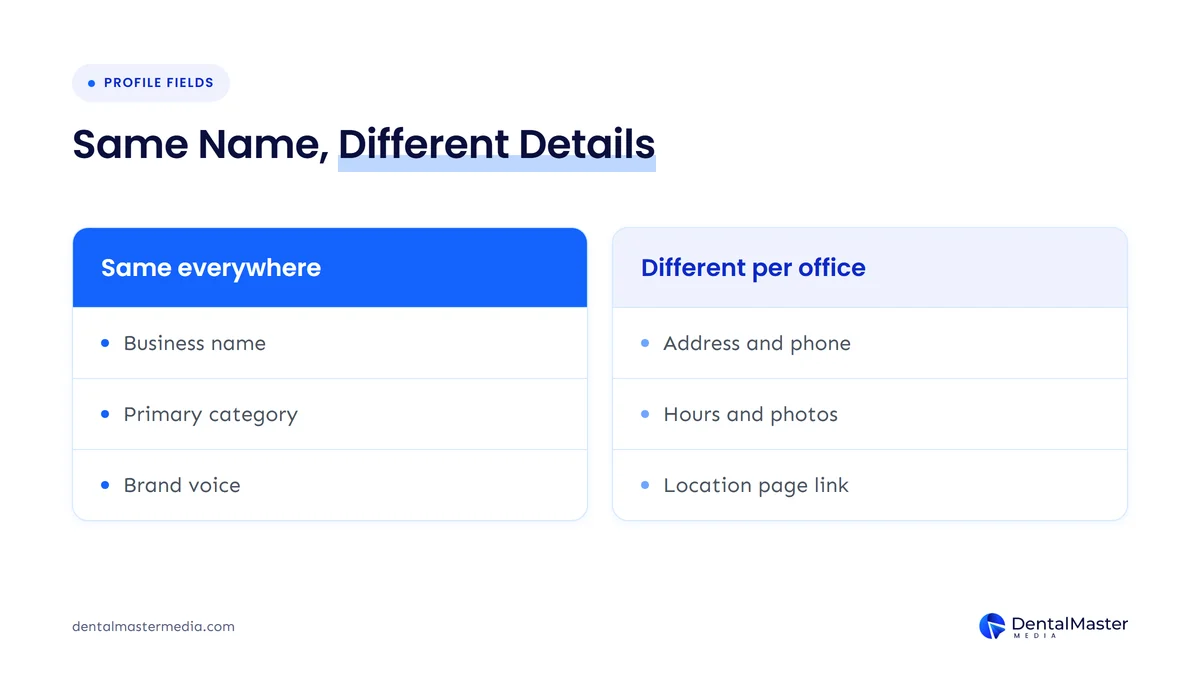
The table below sets out all 7 fields, with the source of each rule.
| Profile field | Same or different for each location | Rule or recommendation | Source |
|---|---|---|---|
| Business name | Same | One name for all locations in the same country, unless a sub-brand name is used consistently | Google guidelines |
| Primary category | Same | The one category that best represents the business, which for general dental offices is the same primary category at every office | Google guidelines |
| Address | Different | The street address of that staffed office | Google guidelines |
| Phone number | Different | The primary customer contact number of that location | Google LocalBusiness markup guide |
| Opening hours | Different | Hours set separately for that location | Google LocalBusiness markup guide |
| Website link | Different | The working URL of that office’s own location page | Google LocalBusiness markup guide |
| Photos and description | Different | Written and photographed from that office’s own team, rooms and neighborhood | DMM recommendation |
The Google Business Profile settings that dental practices most often get wrong, such as booking links and service lists, still apply to every office, and we listed them in 7 Google Business Profile settings dental practices often get wrong.
How should a multi-location dental group give its team access?
A multi-location dental group should manage access through a business group, which Google describes as a more secure way to manage and share access to Business Profiles with co-workers, instead of sharing one login. Each person gets a role, and a new manager gets access to all current and future profiles in the group.
The 5 rules for a business group, taken from Google Business Profile Help, are listed below.
- Roles: owners and managers can both create, edit and delete profiles inside a business group.
- Group deletion: only an owner can delete a business group, and deleting it is permanent.
- Group scope: Google recommends limiting a business group to one account for each business or brand.
- Spreadsheets: a single spreadsheet import cannot span multiple business groups, so each group needs its own spreadsheet.
- Nesting: a business group cannot act as a manager of another business group.
You should name at least 2 owners for each business group, so that one departing employee cannot lock the group out of its profiles.
How do you verify and add a new office?
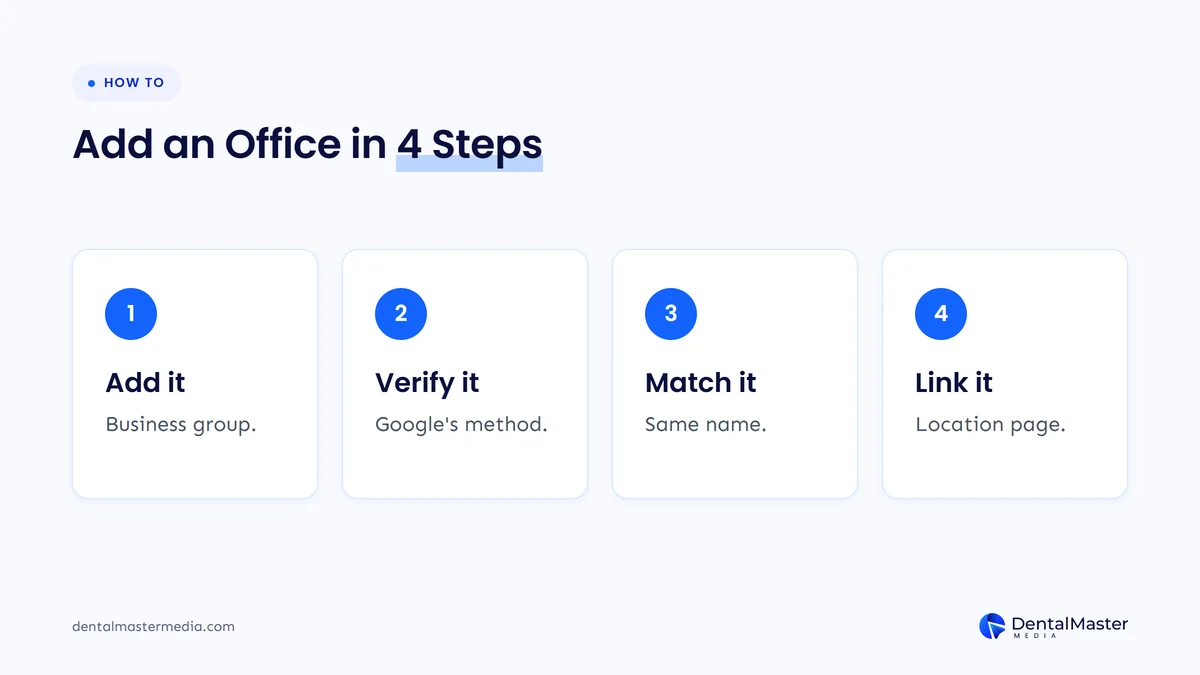
To add a new office, add its address to the business group, verify that profile and link it to its own location page. The 4 steps below work for each new office.
- Add the office to the business group with its own address, phone number and hours.
- Verify the profile with the method Google offers for that address.
- Set the same business name and primary category used at the other offices.
- Link the profile to that office’s location page, then check how it appears in Google Maps.
Larger groups have a faster route. Google’s Business Profile API documentation says “If you own more than 10 locations of the same business, the locations must be verified individually or through bulk verification.” A group with 10 or fewer offices can verify each profile on its own.
What should each location page of a multi-location dental group contain?
Each location page of a multi-location dental group should carry that office’s own address, phone number, hours, dentists, services and directions, so a patient and Google can both tell it apart from the other offices. The 6 elements of a location page are listed below.
- Address and map: the street address of that office, matching the address on its Google Business Profile.
- Phone and hours: the number and opening hours of that office, matching its profile.
- Dentists: the names and bios of the dentists who see patients at that office.
- Services: the treatments that office offers, which can differ from the other offices.
- Directions and parking: written for that building and neighborhood.
- Patient reviews: reviews from that office, not a group-wide average.
Google Search Central warns against creating pages that look the same apart from the city name. Its spam policy defines “Doorway abuse is when sites or pages are created to rank for specific, similar search queries” and lists “Creating substantially similar pages” among the examples, so write each page from that office’s facts instead of copying one template with a new city.
Google’s LocalBusiness guide asks you to “Define each local business location as a https://schema.org/LocalBusiness type,” with the fully qualified URL of that location. Add LocalBusiness markup to each location page, with that office’s own phone number, address and openingHoursSpecification. You can check the pages afterward in Google Search Console.
How should a multi-location dental group manage reviews for each location?
A multi-location dental group should collect, track and answer reviews separately for each office, because patients read reviews about the office they plan to visit and Google counts reviews as part of each profile’s prominence. BrightLocal’s Local Consumer Review Survey 2026, published on February 11, 2026, asked 1,002 US adults about reviews and found that 97% read them and 74% look for reviews written in the last 3 months.
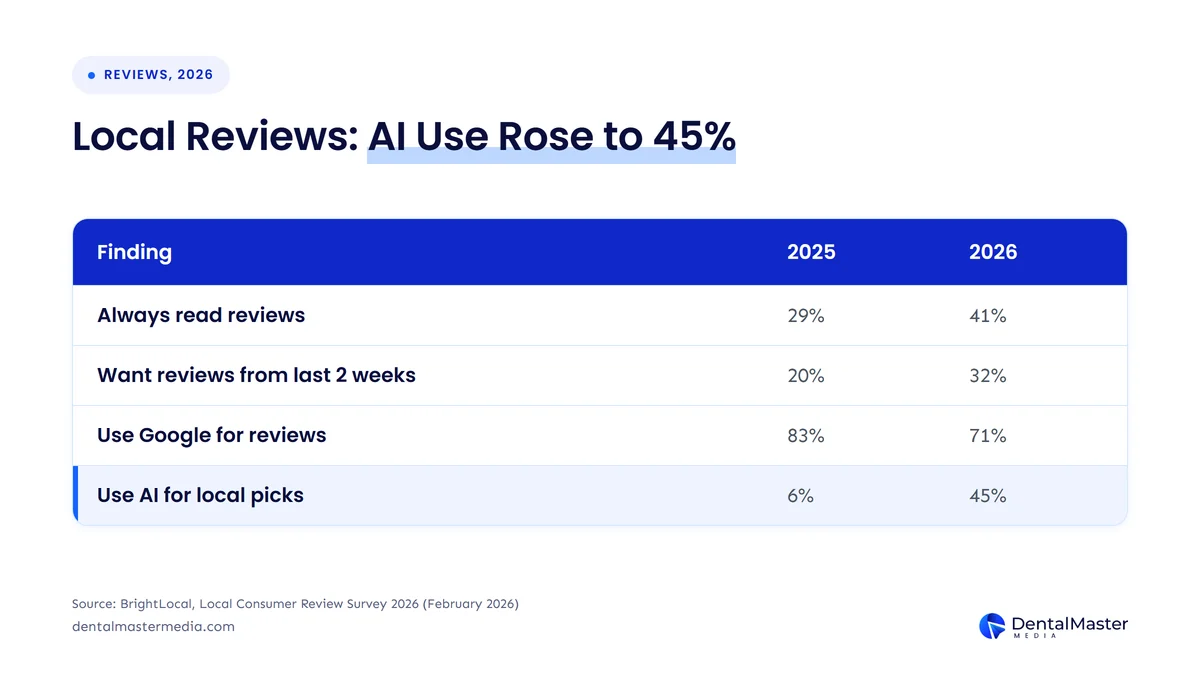
The table below compares 4 findings from the same BrightLocal survey in 2025 and 2026.
| Finding | 2025 | 2026 |
|---|---|---|
| Consumers who always read reviews | 29% | 41% |
| Consumers who want reviews from the last 2 weeks | 20% | 32% |
| Consumers who use Google for reviews | 83% | 71% |
| Consumers who use ChatGPT or other generative AI for local recommendations | 6% | 45% |
The table shows that fresh reviews matter more each year and that 45% of consumers now ask AI tools for local recommendations, so every office needs a steady stream of recent reviews. We explain how reviews shape rankings in how patient reviews drive dental SEO rankings.
Google’s Maps user generated content policy sets review rules that apply to every office in the group. The 4 rules that matter most to a dental group are listed below.
- Incentives: merchants may not offer incentives for a review, a revision or the removal of a negative review.
- Review gating: merchants may not “selectively solicit positive reviews from customers” or discourage negative reviews.
- Pressure: merchants should not require or pressure patients to leave reviews while on the premises.
- Conflict of interest: content based on a conflict of interest is not allowed, and that “may include current or former employment,” so staff must not review their own group’s offices.
You should assign each office its own person to reply to reviews, answer from that office’s profile and never confirm that a reviewer is a patient.
Do Apple Maps, Bing Places and Yelp need the same setup for every office of a multi-location dental group?
No, Apple Maps, Bing Places and Yelp do not need an identical setup, but each office needs its own accurate listing on each platform, with the same name, address and phone number as its Google Business Profile. BrightLocal found that 71% of consumers use Google for reviews in 2026, so Google comes first, and the other platforms come after the Google profiles are complete.
The work is smaller than on Google: claim the listing for each office, copy the confirmed office details and keep them in step when an office moves or changes hours. We compared the 3 platforms in Apple Maps, Bing Places and Yelp for dentists.
Frequently asked questions
Can 2 dental offices share one Google Business Profile?
No, 2 or more dental offices cannot share one Google Business Profile. Google’s guidelines call for 1 profile for each location, and a profile must belong to a real, staffed office at its address.
Do all offices need the same name on Google?
Yes, all offices in the same country need the same business name on Google, according to Google’s guidelines. The exceptions are sub-brand or department names that the business uses consistently. Keep the name identical to the signage and website, and put the city in the address, not in the name.
Should every dentist have a separate Google profile?
No, a dentist does not need a separate Google profile. Google allows a practitioner profile only when the dentist is public-facing and reachable at the verified office, and only 1 profile for each dentist. The office profile does the main work in the map pack.
Does a dental group need bulk verification?
No, a dental group does not need bulk verification to verify its offices, because Google allows each location to be verified individually. Google’s documentation requires individual or bulk verification for businesses with more than 10 locations, so bulk verification is the faster route for groups of that size.
Can every office use the same phone number?
No, we recommend a different phone number for each office. Google’s LocalBusiness guide asks for the primary customer contact number of the specific location, and a shared number hides which office a patient called and which profile brought the call.
The bottom line on Google profiles for a multi-location dental group
A multi-location dental group manages its Google presence best by treating each office as its own unit: 1 verified Google Business Profile, 1 location page and 1 review stream for each location, with a shared name and primary category and access held in a business group.
To see how we set this up for practices, read about our dental SEO services at Dental Master Media.
Find out which office profile needs fixing first
At Dental Master Media, every plan starts with an audit. Our free dental SEO audit shows the local, technical and content gaps holding your practice back, including the state of your Google Business Profile, so you can fix the biggest gaps first.
Sources
- Google Business Profile Help, “Guidelines for representing your business on Google”, accessed November 22, 2026. https://support.google.com/business/answer/3038177
- Google Business Profile Help, “About business groups”, accessed November 22, 2026. https://support.google.com/business/answer/6085326
- Google Business Profile Help, “Improve your local ranking on Google”, accessed November 22, 2026. https://support.google.com/business/answer/7091
- Google Business Profile APIs, “Manage locations”, accessed November 22, 2026. https://developers.google.com/my-business/content/locations
- Google Search Central, “Spam policies for Google web search” (doorway abuse), accessed November 22, 2026. https://developers.google.com/search/docs/essentials/spam-policies
- Google Search Central, “Local business structured data”, accessed November 22, 2026. https://developers.google.com/search/docs/appearance/structured-data/local-business
- Google Maps Help, “Maps user contributed content policy”, accessed November 22, 2026. https://support.google.com/contributionpolicy/answer/7400114
- BrightLocal, “Local Consumer Review Survey 2026” (1,002 US adults, SurveyMonkey panel), February 11, 2026. https://www.brightlocal.com/research/local-consumer-review-survey/

Suraj Rana is the owner of Dental Master Media and a leading expert in SEO for dental practices. With a passion for dental marketing, he has successfully helped numerous dental clinics climb the search engine ranks. Suraj’s expertise makes him a go-to resource for effective, results-driven dental marketing.