Quick answer: Yes, a dental website should be accessible. Build it to WCAG 2.2 Level AA, because the U.S. Department of Justice says the ADA applies to services businesses offer on the web, and the CDC reports that more than 1 in 4 US adults have a disability. Your legal duties depend on your practice, so ask a lawyer. This is not legal advice.
Key takeaways
- Dental website accessibility means people with disabilities can perceive, operate and understand your site. The standard for it is WCAG, and WCAG 2.2 has been a W3C Recommendation since October 5, 2023.
- The U.S. Department of Justice says the ADA applies to what businesses open to the public offer on the web, but no federal regulation sets a technical web standard for private practices.
- The DOJ Title II web rule covers state and local governments, not private practices. The HHS Section 504 rule can cover a dental practice that receives HHS federal financial assistance, with dates in 2027 and 2028.
- More than 1 in 4 US adults (over 70 million, 2022 data) report a disability, and 43.9% of adults aged 65 and older do, per the CDC.
- WebAIM found detectable WCAG 2 failures on 95.9% of the top 1,000,000 home pages in February 2026. Low color contrast was the most common, at 83.9%.
- Test with an automated scan plus a keyboard check, a screen reader check and a manual audit. An accessibility overlay does not replace those fixes.
What is dental website accessibility?
Dental website accessibility is the practice of building a dental practice website so that people with disabilities can use it. The World Wide Web Consortium (W3C) Web Accessibility Initiative says accessible websites work for people with auditory, cognitive, neurological, physical, speech and visual disabilities, and also for older people and for people in situational limits such as bright sunlight.
The standard that defines dental website accessibility is the Web Content Accessibility Guidelines (WCAG), published by the W3C. Each WCAG rule is called a success criterion, and each one has a level of A, AA or AAA. Level AA is the level that laws and agreements usually name.
Accessibility is one part of dental website design, next to page speed, structure and booking paths. Our dental website design work builds it in from the first layout, so a patient with low vision or a motor disability can find your hours, read about a treatment and request an appointment.
What does WCAG 2.2 require?
WCAG 2.2 requires that web content meets success criteria grouped under 4 principles, and the 4 principles of WCAG 2.2 are listed below.
- Perceivable: information and user interface components must be presentable to users in ways they can perceive, such as alt text for images and captions for video.
- Operable: user interface components and navigation must be operable, such as a menu and a booking form that work by keyboard alone.
- Understandable: information and the operation of the interface must be understandable, such as clear form labels and error messages.
- Robust: content must work reliably with a wide range of browsers and assistive technologies, including a screen reader.
WCAG 2.2 became a W3C Recommendation on October 5, 2023. It adds 9 new success criteria: 2 at Level A, 4 at Level AA and 3 at Level AAA. The 4 new Level AA criteria are 2.4.11 Focus Not Obscured (Minimum), 2.5.7 Dragging Movements, 2.5.8 Target Size (Minimum) and 3.3.8 Accessible Authentication (Minimum). The 2 new Level A criteria are 3.2.6 Consistent Help and 3.3.7 Redundant Entry.
The W3C says the WCAG 2.0 and WCAG 2.1 criteria are essentially the same in WCAG 2.2, and that it removed one obsolete criterion, 4.1.1 Parsing. A dental practice that builds to WCAG 2.2 Level AA therefore also aims at WCAG 2.1 Level AA, the version that the 2024 government rules name.
What do the ADA and other US rules say about dental website accessibility?
The Americans with Disabilities Act (ADA) applies to the services a business open to the public offers on the web, according to the U.S. Department of Justice, but no federal regulation sets a technical web standard for private dental practices. The DOJ’s web guidance, dated March 18, 2022, says Title III businesses must provide “full and equal enjoyment” of their goods and services, and that the ADA’s requirements apply to offerings “including those offered on the web.”
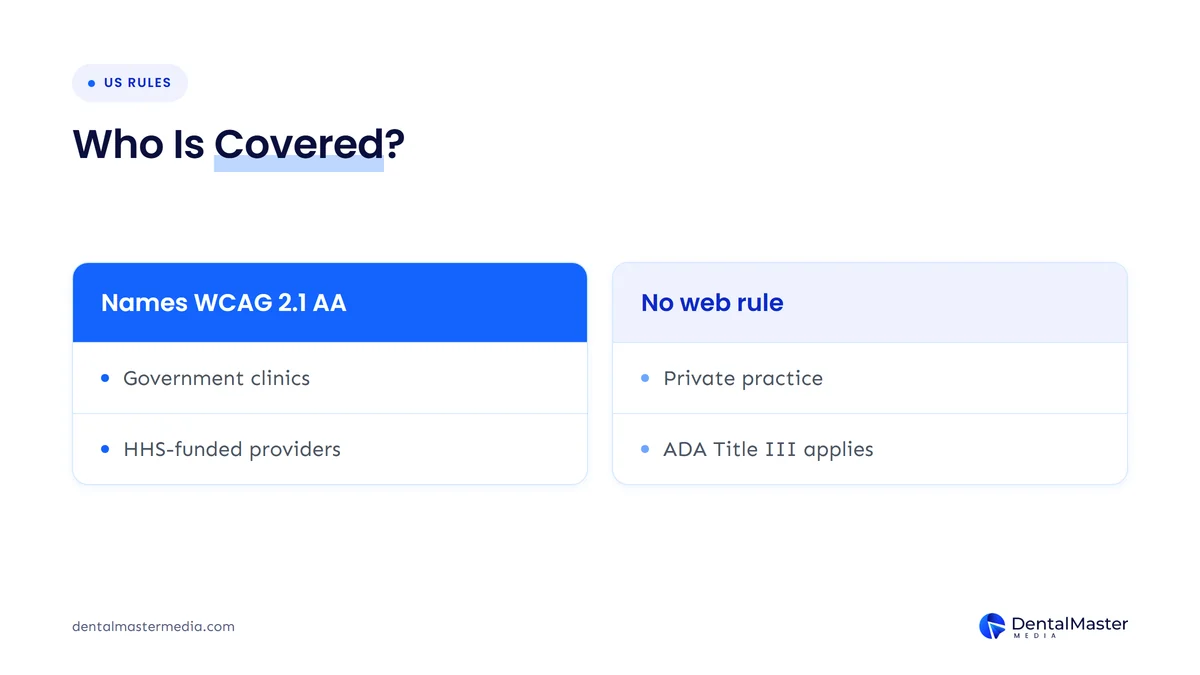
The same DOJ guidance names WCAG as helpful guidance and says businesses have flexibility in how they meet their duty, because the DOJ has no regulation with detailed web standards for Title III. A private dental practice open to patients is the kind of business Title III covers, so the safe reading is that the ADA is relevant to your website even though the technical standard is not written into a rule. The table below sets the 3 rules side by side as of November 23, 2026.
| Rule | Who it covers | Web standard | Compliance dates |
|---|---|---|---|
| ADA Title III (DOJ web guidance, March 18, 2022) | Businesses open to the public, including a private dental practice | No regulation sets detailed web standards; WCAG is named as helpful guidance | None set |
| ADA Title II web rule (DOJ, 2024; dates amended April 20, 2026) | State and local government entities | WCAG 2.1 Level AA | April 26, 2027 (population 50,000 or more); April 26, 2028 (smaller entities and special districts) |
| Section 504 of the Rehabilitation Act, HHS rule (dates amended May 11, 2026) | Recipients of HHS federal financial assistance, including health care providers | WCAG 2.1 Level AA | May 11, 2027 (15 or more employees); May 10, 2028 (fewer than 15) |
The table shows that only 2 of the 3 rules name a technical standard, and neither of those 2 is a rule written for a private practice with no HHS funding.
Does the DOJ Title II rule apply to a dental practice?
No, the DOJ Title II web rule does not apply to a private dental practice, because it covers state and local government entities only. The interim final rule published in the Federal Register on April 20, 2026 says it “only pertains” to Title II and does not address the Title III regulations that cover private businesses.
The 2024 Title II rule adopts WCAG 2.1 Level AA, and the April 2026 notice moved its compliance dates to April 26, 2027 for entities with a population of 50,000 or more and April 26, 2028 for smaller entities. A dental clinic that a state or local government runs, such as a county health department clinic, is a government entity, so the Title II rule may apply to it.
Does the HHS Section 504 rule apply to a dental practice?
It can, because the HHS Section 504 rule covers any entity that receives federal financial assistance from the Department of Health and Human Services, directly or indirectly, and it requires that entity’s web content and mobile apps to meet WCAG 2.1 Level AA. The American Dental Association lists Medicaid and Children’s Health Insurance Program dental providers, community health centers with dental services and dental practices affiliated with hospitals or health systems among the covered groups.
The HHS Office for Civil Rights extended the compliance dates in an interim final rule published in the Federal Register on May 11, 2026. Recipients with 15 or more employees now have until May 11, 2027, and recipients with fewer than 15 employees have until May 10, 2028. The rule covers web content provided directly or through contractual, licensing or other arrangements, which can include a third-party booking tool or patient portal.
Whether your practice counts as a recipient depends on how it is paid, so confirm it with a healthcare lawyer. Check the Federal Register for any later change to these dates.
Which patients need dental website accessibility?
More than 1 in 4 US adults need an accessible website, because the CDC reports that over 70 million adults in the United States had a disability in 2022. The CDC also reports that 43.9% of adults aged 65 and older have a disability, the highest rate of any age group, and older adults are a large share of the patients who look up dental treatments such as implants and dentures.
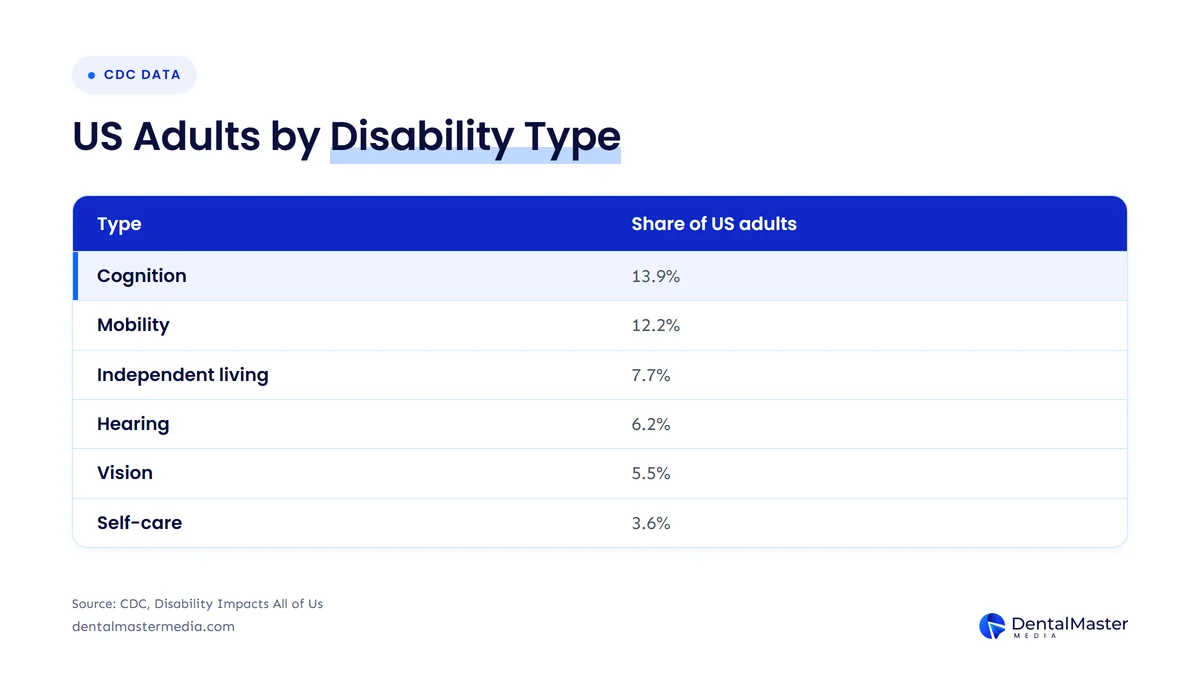
The CDC splits the disability share into 6 functional types, and the table below shows each type with the share of US adults who report it. A person can report more than one type, so the shares overlap and do not add up to the overall rate.
| Disability type (CDC) | Share of US adults | What it can mean on a dental website |
|---|---|---|
| Cognition | 13.9% | Clear wording, simple forms and consistent help are easier to use |
| Mobility | 12.2% | A keyboard or voice control replaces a mouse, so every control must work without one |
| Independent living | 7.7% | A patient may book with help, so a form needs clear labels and steps |
| Hearing | 6.2% | Videos need captions and phone-only contact needs a form or text option |
| Vision | 5.5% | A screen reader reads the page, so images need alt text and text needs strong color contrast |
| Self-care | 3.6% | A patient may use a caregiver, so the site must still work by assistive technology |
The table shows that cognition and mobility reach more patients than vision does, so accessibility is about forms, layout and keyboard use as much as it is about screen readers.
Which dental website accessibility problems are most common?
Low-contrast text is the most common accessibility failure, found on 83.9% of the top 1,000,000 home pages in WebAIM’s February 2026 scan. WebAIM, a nonprofit at Utah State University, detected WCAG 2 failures on 95.9% of those home pages, with an average of 56.1 errors per page, up from 51 in 2025. These figures cover all sites, not only dental sites, and they count only what an automated tool can detect.
The six most common failure types in the WebAIM Million 2026 report are listed in the table below, with how each one tends to look on a dental practice site.
| Failure (WebAIM Million 2026) | Share of home pages | Where it shows on a dental website |
|---|---|---|
| Low contrast text | 83.9% | Light gray text on a white background, or text over a smile photo |
| Missing alternative text for images | 53.1% | Team photos, treatment images and logo links with no alt text |
| Missing form input labels | 51% | Contact and appointment forms with a placeholder but no label |
| Empty links | 46.3% | Social icons or phone icons with no text a screen reader can read |
| Empty buttons | 30.6% | Icon-only menu or booking buttons |
| Missing document language | 13.5% | A page with no language set, so a screen reader may pronounce it wrongly |
The same 6 failure types led the report again in 2026, and each one is a fix a web designer can make without changing how the site looks to most visitors. The design side of these problems sits in our dental website design guide, and the form side sits in the post on dental website conversion and booked appointments.
How do you test dental website accessibility?
You test dental website accessibility in 4 steps: run an automated scan, tab through each page with a keyboard, check with a screen reader and zoom, and have a person audit the booking path. The W3C says tools cannot check all accessibility aspects automatically and that human judgement is required, so a scan alone is not a test.
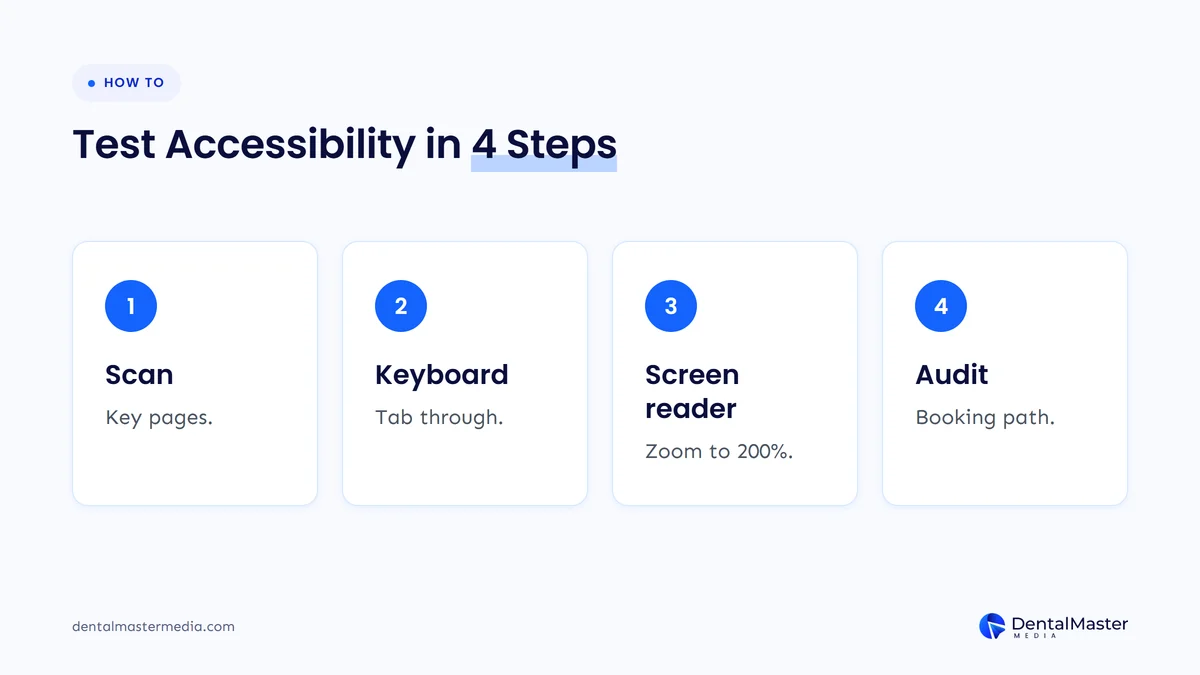
The 4 steps to test a dental website are listed below.
- Scan the key pages: run a free checker such as WAVE from WebAIM on the homepage, one treatment page, the contact page and the appointment form, and write down every error.
- Tab through each page with a keyboard: press Tab and check that every link, button and form field can be reached in a logical order and that the focus outline stays visible.
- Listen with a screen reader and zoom to 200%: use NVDA on Windows or VoiceOver on iPhone to hear the page, and confirm that nothing is cut off at 200% zoom.
- Get a manual audit of the booking path: ask an accessibility specialist to test the full route from the homepage to a submitted appointment request and to write down each failed success criterion.
Repeat the test after every redesign, new plugin or change to the booking tool, because one update can break a page that passed before.
How do you fix dental website accessibility problems?
You fix dental website accessibility problems one success criterion at a time, starting with the failures that block a patient from reaching your hours, treatments or appointment form. The 6 fixes below map to the most common failures and to WCAG 2.2 Level AA criteria.
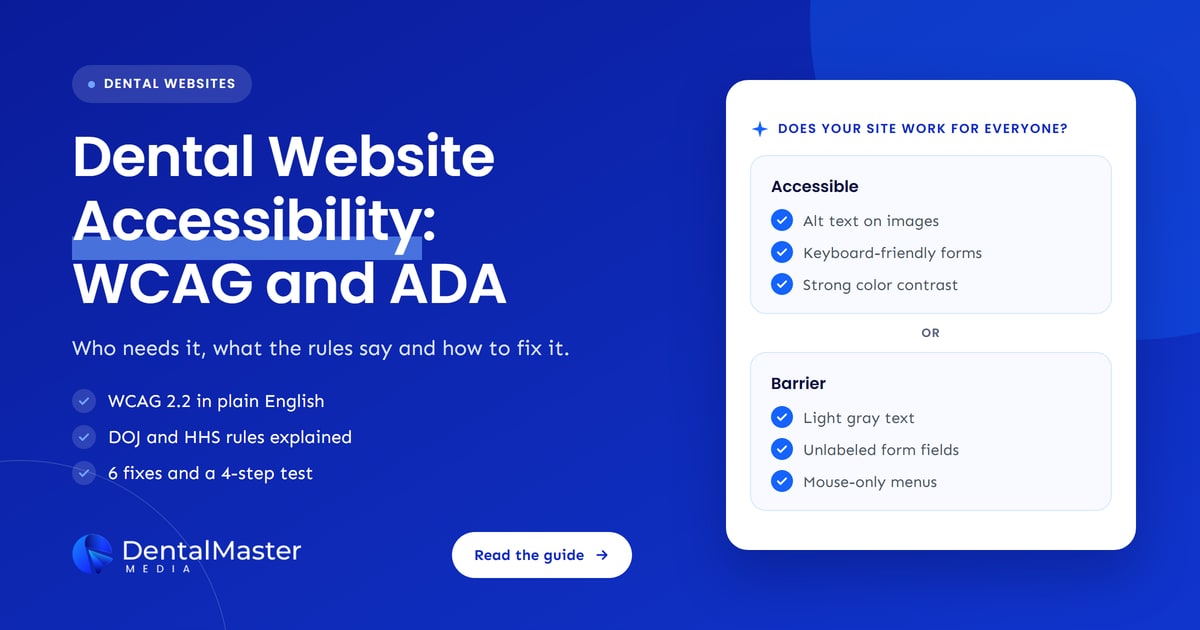
- Add alt text to every meaningful image: describe what the image shows in a short phrase, and leave decorative images empty (criterion 1.1.1 Non-text Content).
- Raise color contrast to at least 4.5:1: check normal body text and buttons against their backgrounds (criterion 1.4.3 Contrast Minimum).
- Label every form field: give each field in the appointment and contact forms a visible label, not only a placeholder (criteria 1.3.1 and 3.3.2).
- Make every control work by keyboard: confirm that menus, sliders, pop-ups and the booking widget can be used without a mouse (criterion 2.1.1 Keyboard).
- Add captions to videos: caption every pre-recorded video, such as a treatment explainer or office tour (criterion 1.2.2 Captions).
- Size tap targets at 24 by 24 CSS pixels or more: make phone, menu and booking buttons large enough to tap on a phone (criterion 2.5.8 Target Size, new in WCAG 2.2). Speed and mobile layout are covered in dental website speed.
An accessibility overlay is a script that adds a toolbar or automatic changes on top of a website, and it does not replace these fixes. In April 2025 the Federal Trade Commission finalized an order requiring the overlay company accessiBe to pay $1 million over claims that its tool made websites WCAG compliant, and the order requires the company to substantiate such claims in future.
What should you ask a web designer about accessibility?
Ask a web designer which WCAG version and level they build to, how they test the site and who fixes problems after launch. The 6 questions below turn those points into a checklist you can use before you sign.
- Which WCAG version and level do you build to? The answer should be WCAG 2.2 Level AA, or WCAG 2.1 Level AA at the least.
- How do you test dental website accessibility? The answer should include an automated scan, a keyboard check, a screen reader check and a zoom check.
- Do you use an accessibility overlay? A designer who fixes the code does not need one.
- Are the booking tool, forms and patient portal accessible? Third-party tools belong in the contract, because the HHS rule covers content provided through contractual arrangements.
- Can I see the test results? A test log or audit summary shows what was checked and what failed.
- Who fixes new problems after launch? Accessibility needs a recheck after each change, so ask who owns it.
Dental Master Media states WCAG 2.2 Level AA as the target for every build and describes its testing on the ADA compliant dental website page.
Frequently asked questions
Does the ADA require my dental website to be accessible?
Yes, in the Department of Justice’s view, because the ADA’s requirements apply to what businesses open to the public offer on the web. No federal regulation sets technical web standards for private practices, so how a court or agency would judge your site is a legal question. Ask a lawyer about your own situation.
Can a dental practice be sued over an inaccessible website?
Yes, it is possible. A June 2021 Dental Economics article by David A. Hall, DDS, says dentists can be sued over inaccessible websites and that over 90% of such cases settle without trial. That article is a dentist’s view, not legal advice, so ask a lawyer about the current risk for your practice.
Should I build to WCAG 2.1 or WCAG 2.2?
Build to WCAG 2.2 Level AA. The W3C says the WCAG 2.0 and 2.1 criteria are essentially the same in WCAG 2.2, and WCAG 2.2 adds 6 new criteria at Levels A and AA. The government rules named above still cite WCAG 2.1 Level AA, so a WCAG 2.2 build covers that version too.
Does an accessibility plugin or overlay make my dental website compliant?
No, an accessibility overlay does not make a website compliant by itself. The W3C says automated tools cannot check all accessibility aspects, and in April 2025 the Federal Trade Commission ordered accessiBe to pay $1 million over claims that its tool made websites WCAG compliant.
Do accessibility rules cover PDFs and booking tools on my website?
Yes, for practices that the rules cover. The HHS Section 504 rule and the DOJ Title II rule both apply to web content provided directly or through contractual, licensing or other arrangements. A patient intake PDF or an online booking tool on a covered practice’s site is therefore in scope, and an HTML form is easier to make accessible than an image-only PDF.
Conclusion
Dental website accessibility means a patient with a disability can use your site, and WCAG 2.2 Level AA is the standard to build to. The DOJ says the ADA applies on the web, the DOJ Title II rule covers governments, the HHS Section 504 rule can cover HHS-funded dental providers and more than 1 in 4 US adults report a disability. The most common failures are low contrast, missing alt text and unlabeled forms, and you find them with a scan, a keyboard, a screen reader and a manual audit. This post is not legal advice, so confirm your own duties with a lawyer.
At Dental Master Media, accessibility belongs in the build, not in a plugin added later. See our dental website design service for the build, and our dental SEO services for getting the finished site found by patients on Google and in AI answers.
Book a free dental website strategy call
Tell us about your current dental website and we will walk through how it handles accessibility, speed and booking, and what a rebuild would involve. The call is free and has no obligation.
Sources
- W3C, “What’s New in WCAG 2.2”, WCAG 2.2 W3C Recommendation of October 5, 2023, accessed November 23, 2026. https://www.w3.org/WAI/standards-guidelines/wcag/new-in-22/
- W3C, “Web Content Accessibility Guidelines (WCAG) 2.2”, accessed November 23, 2026. https://www.w3.org/TR/WCAG22/
- W3C Web Accessibility Initiative, “Introduction to Web Accessibility”, accessed November 23, 2026. https://www.w3.org/WAI/fundamentals/accessibility-intro/
- W3C Web Accessibility Initiative, “Selecting Web Accessibility Evaluation Tools”, accessed November 23, 2026. https://www.w3.org/WAI/test-evaluate/tools/selecting/
- U.S. Department of Justice, ADA.gov, “Guidance on Web Accessibility and the ADA”, March 18, 2022. https://www.ada.gov/resources/web-guidance/
- Federal Register, “Extension of Compliance Dates for Nondiscrimination on the Basis of Disability; Accessibility of Web Information and Services of State and Local Government Entities” (interim final rule, 91 FR), April 20, 2026. https://www.govinfo.gov/content/pkg/FR-2026-04-20/html/2026-07663.htm
- Federal Register, HHS Office for Civil Rights, “Extension of Compliance Dates for Nondiscrimination on the Basis of Disability; Accessibility of Web Information and Services” (interim final rule, 91 FR), May 11, 2026. https://www.govinfo.gov/content/pkg/FR-2026-05-11/html/2026-09266.htm
- American Dental Association, ADA News, “HHS Office for Civil Rights extends compliance deadline for digital accessibility final rule to May 2027”, May 2026. https://adanews.ada.org/ada-news/2026/may/hhs-office-for-civil-rights-extends-compliance-deadline-for-digital-accessibility-final-rule-to-may-2027/
- CDC, “CDC Data Shows Over 70 Million U.S. Adults Reported Having a Disability”, July 16, 2024 (2022 BRFSS data). https://www.cdc.gov/media/releases/2024/s0716-Adult-disability.html
- CDC, “Disability Impacts All of Us” infographic, accessed November 23, 2026. https://www.cdc.gov/disability-and-health/articles-documents/disability-impacts-all-of-us-infographic.html
- WebAIM, “The WebAIM Million: The 2026 report on the accessibility of the top 1,000,000 home pages”, February 2026 scan. https://webaim.org/projects/million/
- Federal Trade Commission, “FTC Approves Final Order Requiring accessiBe to Pay $1 Million”, April 2025. https://www.ftc.gov/news-events/news/press-releases/2025/04/ftc-approves-final-order-requiring-accessibe-pay-1-million
- Dental Economics, David A. Hall, DDS, “Can you be sued if your website isn’t ADA-accessible?”, June 1, 2021. https://www.dentaleconomics.com/practice/article/14202794/can-dentists-be-sued-if-their-websites-are-not-accessible

Suraj Rana is the owner of Dental Master Media and a leading expert in SEO for dental practices. With a passion for dental marketing, he has successfully helped numerous dental clinics climb the search engine ranks. Suraj’s expertise makes him a go-to resource for effective, results-driven dental marketing.